
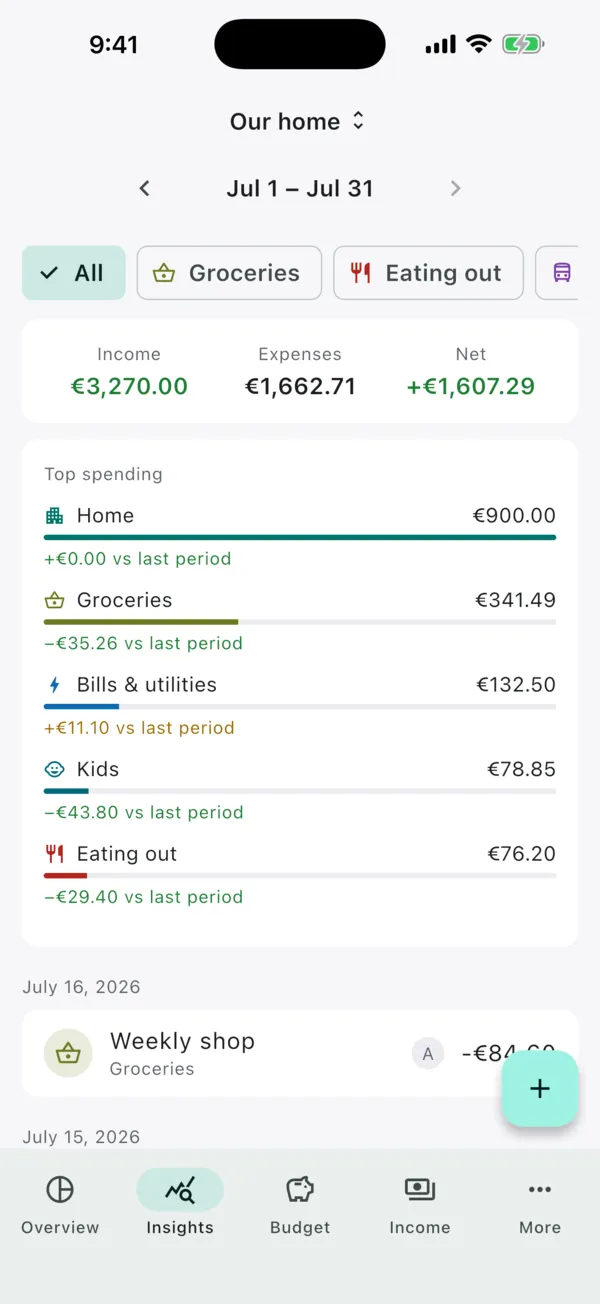
A travel budget app should answer one question at any moment of the trip: how much is left for the days we still have? Bill Tracker does that by giving the trip a space of its own — separate from your home budget, with its own envelopes, its own budget and its own currency — so holiday spending doesn't get mixed up with the groceries at home.
Why trip money is so hard to keep track of
Holidays are when budgets usually fall apart, and not because people are careless. A few things happen at once:
- The spending is scattered. Card at the hotel, cash at the market, your partner's card at dinner. Nobody has the full picture.
- Every day feels like an exception. Day three, the ice creams, the taxi back, the boat trip — each one is small, and the total only shows up on the statement two weeks later.
- Home and holiday get mixed. Holiday spending lands in the same list as rent and groceries, and the next month's budget looks broken.
The fix isn't a spreadsheet you'll fill in "when we get back". It's a budget that lives on the phones you already carry, where the decision happens.
How Bill Tracker works as a travel budget app
- A space for the trip. A space has its own members, envelopes, budget and currency. Create one for "Summer in Portugal" next to your home space and switch between them in one tap.
- Envelopes for the holiday. Start from ready-made categories or make your own — Accommodation, Food & drinks, Transport, Activities, Souvenirs — and give each a budget, or set one total for the whole trip.
- Logging in seconds, even offline. Amount, envelope, save, on a large numpad. Logging works without a connection, which helps when you're on a ferry or avoiding roaming. Siri can log an expense too: "Log expense in Bill Tracker".
- Everyone on the trip logs. Invite your partner or travel companions with a link; everyone logs and everyone sees the same numbers. Kids can be added by name.
- Insights for any period. See top categories and who spent what, filtered by person or by envelope.
- No bank connection. Bill Tracker never reads your account. You type each expense, and there's no account to create.
What a trip budget looks like on day four
Two adults, a seven-day trip, accommodation paid up front. Here's the trip space on the evening of day four:
| Envelope | Budget | Spent | Left |
|---|---|---|---|
| Accommodation | 900 | 900.00 | 0.00 |
| Food & drinks | 450 | 212.40 | 237.60 |
| Transport | 200 | 86.00 | 114.00 |
| Activities | 300 | 145.00 | 155.00 |
| Souvenirs | 100 | 18.50 | 81.50 |
| Total | 1,950 | 1,361.90 | 588.10 |
Three days to go and 237.60 left for food and drinks — about 79 a day. That's a number you can plan dinner around, and it's far better to see it on day four than on the bank statement afterwards.
Paying in another currency
Each space has its own currency, so a trip space can simply use the currency of the country you're visiting. If you cross a border on a day trip and pay in a third currency, Premium lets you log that expense in the currency you actually paid. It's kept exactly as you typed it, with no conversion, and listed separately from the budget totals — Bill Tracker doesn't fetch exchange rates or convert anything, so there are no surprises from a rate you didn't choose.
Travelling with friends: a shared budget, not a bill splitter
When several people travel together, the trip space shows everything that was spent and who spent it. Insights filter by person, so it's easy to see that one of you has paid for most of the dinners.
What the app doesn't do is calculate who owes whom or settle debts. It's a shared budget, not a bill-splitting calculator. Many groups find that's enough: they agree on a trip budget, see who paid what at the end, and settle up by hand.
Free or Premium for a trip
The free plan includes 1 space, up to 2 people in it, up to 10 envelopes, insights, recurring bills and CSV export. A couple can run a trip budget in their home currency on it — though with just one space, the trip shares it with your everyday budget, and expenses in another currency need Premium.
Premium adds unlimited spaces, people and envelopes, plus expenses in other currencies. That's what lets you keep a separate trip space next to your home budget or travel as a group of more than two. Joining someone else's space by invite is always free. Premium is available as a monthly or yearly subscription or a one-time Lifetime purchase, and there's a free trial.
Start in 3 steps
- Install Bill Tracker on your iPhone or iPad. No account, no email, no password.
- Create a space for the trip. Choose its currency, add envelopes for accommodation, food, transport and activities, and give each an amount.
- Invite your travel companions with a link and log every purchase when it happens. Check the envelopes each evening.
Guides for the money side of a trip
- How to make a family budget — the monthly plan your holiday has to fit into.
- How to track monthly expenses by hand — the logging habit that also works on the road.
- Envelope budgeting categories — how many envelopes you really need, at home or away.
FAQ
Is there a free travel budget app?
Bill Tracker's free plan gives you 1 space with up to 2 people and up to 10 envelopes, including insights and CSV export — enough for a couple's trip budget. Premium adds unlimited spaces and people and expenses in other currencies.
Can I log trip expenses without internet?
Yes. Logging expenses works offline, so you can record spending on a ferry, in the mountains or without roaming.
Does Bill Tracker convert currencies?
No. Each space has its own currency. With Premium you can log an expense in a different currency; it's kept as you typed it, with no conversion, and listed separately from the budget totals.
Can we split travel costs between friends?
Bill Tracker shows who spent what in a shared trip space, but it doesn't calculate who owes whom or settle debts. You can use the totals per person and settle up by hand.
Will the trip mix with my home budget?
Not if you give it its own space: each space has separate envelopes, budget and currency. Keeping a second space next to your home budget needs Premium.
Is there an Android version?
Not yet. Bill Tracker runs on iPhone and iPad (iOS 15 or later). An Android version is on its way — you can join the waitlist on the home page.