
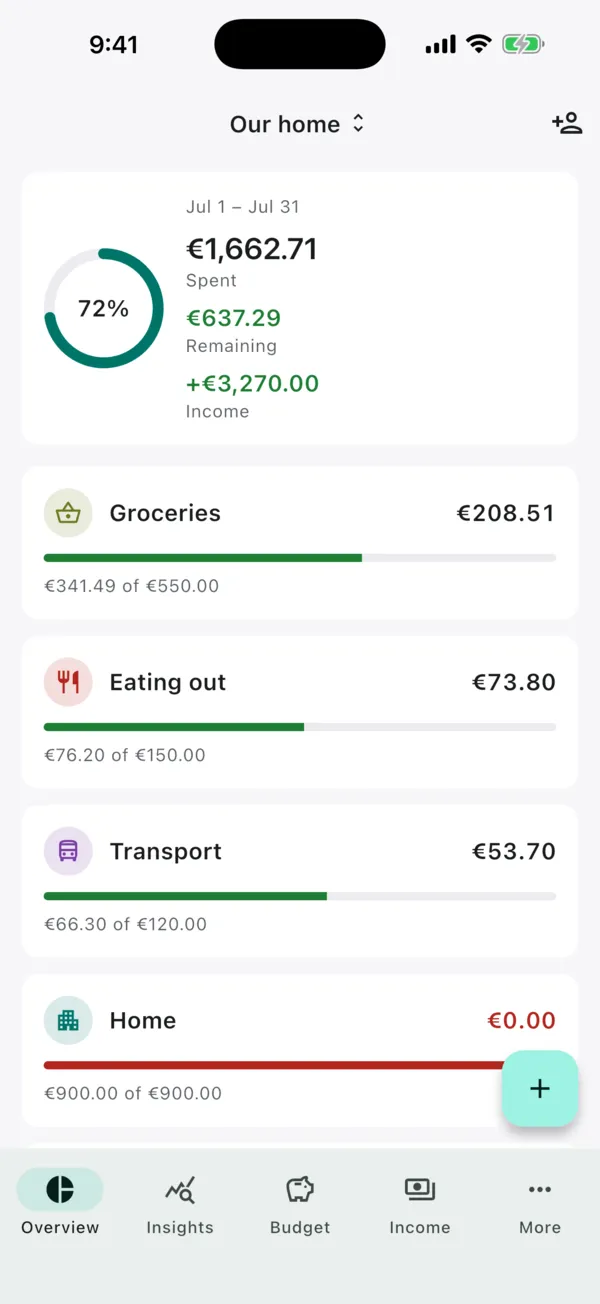
An envelope budgeting app keeps the old cash-envelope idea — every euro, dollar or pound has a job — and drops the paper. You decide at the start of the month how much goes into each envelope, and each purchase comes out of one of them. Bill Tracker is built around exactly that: envelopes first, everything else second.
Why use an envelope budgeting app instead of cash envelopes
Cash envelopes work because you can see the money shrink. The trouble is that most of us pay by card, split costs with a partner and don't want a drawer full of envelopes. A digital envelope budget keeps the part that works and fixes the rest:
- It doesn't matter how you paid. Card, cash, a partner's card — you type the amount and pick the envelope.
- You see every envelope at once. No counting coins: each envelope shows what's spent and what's left.
- It travels with you. The envelopes are on your phone when you're standing at the till, which is when the decision actually happens.
How the envelope method works in Bill Tracker
- Envelopes your way. Start from ready-made categories or create your own, with custom names, icons and colours. Press, hold and drag to put the envelopes you use most at the top.
- A budget per envelope. Give each envelope its own monthly amount. If you'd rather start lighter, set one total for the month, or no budget at all and simply track.
- A month that starts on payday. Paid on the 25th? Your budget month can run from the 25th to the 24th, so the envelopes refill when the money actually arrives.
- Logging in seconds. Amount, envelope, save, on a large numpad. Logging works offline, and Siri can log an expense without opening the app ("Log expense in Bill Tracker").
- Recurring bills and income. Rent, phone contract, subscriptions and salary can repeat every month automatically, so the fixed envelopes fill themselves in.
- Insights. Income vs expenses, your top spending categories and the change since last month, for any period.
There's no bank connection: Bill Tracker never reads your account. You type each expense, and that small moment of typing is part of what makes the envelope method work.
What an envelope month looks like
Here's a household two weeks into its budget month, looking at the day-to-day envelopes:
| Envelope | Budget | Spent | Left |
|---|---|---|---|
| Groceries | 600 | 342.80 | 257.20 |
| Transport | 220 | 96.00 | 124.00 |
| Eating out | 150 | 118.50 | 31.50 |
| Kids | 180 | 64.90 | 115.10 |
| Total | 1,150 | 622.20 | 527.80 |
One glance says it: groceries and transport are on track, but Eating out has only 31.50 left for the next two weeks. That's the conversation the envelope method is meant to start — before the money is gone, not after.
Envelopes for two, or for the whole household
Envelopes work best when everyone who spends from them can see them. In Bill Tracker a space has its own members, envelopes, budget and currency. Invite your partner with a link and you both log expenses in the same envelopes and see the same numbers. Kids or grandparents without a phone can be added by name, and insights show who spent what, filtered by person or by envelope.
You can keep separate spaces for home, a trip or a renovation, and switch between them in one tap. The app doesn't work out who owes whom — a space is one shared budget, not a bill splitter.
What Bill Tracker doesn't do
Some envelope apps do more, and it's fair to say what this one leaves out:
- Leftover money doesn't roll over on its own. At the end of the month you decide what to do with it — for example, raise next month's amount for an envelope by hand.
- No savings goals and no debt payoff plans.
- No bank import and no bill reminders. Every expense is typed, and due dates stay in your own calendar.
Free to start, Premium when you need more
The free plan includes 1 space, up to 2 people, up to 10 envelopes, insights, recurring bills and CSV export — enough for a couple to run a full envelope budget. Joining someone else's space by invite is always free.
Premium adds unlimited spaces, people and envelopes, plus expenses in other currencies, kept as you typed them with no conversion and listed separately from the budget totals. It's available as a monthly or yearly subscription or a one-time Lifetime purchase, and there's a free trial.
Start in 3 steps
- Install Bill Tracker on your iPhone or iPad. No account, no email, no password.
- Create your envelopes. Keep the ready-made ones or rename them, and give each an amount based on what you really spent last month.
- Log every purchase when it happens and check the envelopes once a week. Set salary and fixed bills to repeat so you only type what changes.
Guides to the envelope method
- Envelope budgeting categories — a starter list of envelopes and how many you really need.
- Envelope budgeting pros and cons — where the method shines and where it's hard work.
- Envelope budgeting for couples — how to set up shared envelopes in one evening.
FAQ
Is there a free envelope budgeting app?
Bill Tracker's free plan lets you run an envelope budget with up to 10 envelopes in 1 space, shared with up to 2 people, including insights, recurring bills and CSV export. Premium adds unlimited spaces, people and envelopes.
Can I still use cash with digital envelopes?
Yes. The app doesn't care how you paid: type the amount you spent in cash and choose the envelope, exactly as you would for a card payment.
What happens to money left in an envelope at the end of the month?
Nothing automatic — leftover money doesn't roll over by itself. You decide what to do with it, for example by giving that envelope a higher amount next month.
Can my partner and I share the same envelopes?
Yes. Invite your partner to your space with a link. You both log expenses in the same envelopes and see the same numbers, and insights show who spent what.
Does the envelope budgeting app connect to my bank?
No. Bill Tracker never connects to a bank or card. You type each expense yourself, and there's no account to create.
Is there an Android version?
Not yet. Bill Tracker runs on iPhone and iPad (iOS 15 or later). An Android version is on its way — you can join the waitlist on the home page.