
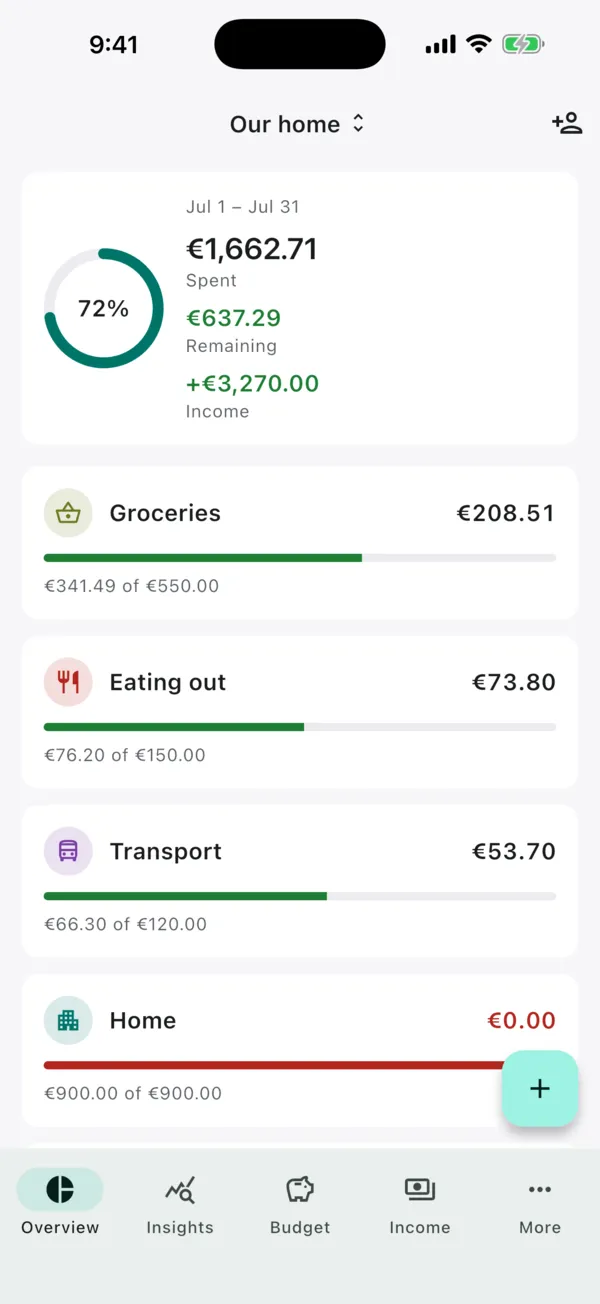
A budget app for couples has one job: make sure both of you look at the same numbers. Bill Tracker does that with one shared space on both phones — the same envelopes, the same budget, every expense either of you logs, visible on both phones.
Why couples give up on budgeting
Many couples who start a budget give up on it, and rarely because of money. The budget lives on one person's laptop, so the other never sees it. Card payments are sorted on Sunday evening, when nobody remembers what Tuesday's 23.80 was. And "how are we doing this month?" gets an answer like "fine, I think".
A shared budget only works when three things are true:
- Both of you can add an expense in the moment, from your own phone.
- Both of you see the same total without asking the other.
- The rules were agreed in advance, so a coffee or a pair of shoes doesn't turn into a discussion.
How Bill Tracker works as a budget app for couples
You create one space — "Home", "Us", whatever you like — and invite your partner with a link. From then on it's one budget on two phones:
- Envelopes for everything you share: rent, groceries, eating out, holidays. Each envelope gets a monthly amount, or you set one total for the month, or none at all.
- Logging takes a few seconds: amount, envelope, save. It works offline, and on iPhone you can say "Log expense in Bill Tracker" to Siri without opening the app.
- Recurring income and bills: salaries, rent and subscriptions can be set to repeat every month, so you only type what changes.
- The month starts when your money arrives: if you're both paid on the 25th, the budget month can run from the 25th to the 24th.
A small example. Sam and Alex give their groceries envelope 600 for the month. On the 9th Sam logs 74.20 at the supermarket; on the 11th Alex logs 38.50 from the bakery and the market. Both phones now show 487.30 left in groceries — and neither of them had to ask.
Separate accounts, different incomes — still one budget
You don't need a joint bank account. Bill Tracker never connects to a bank, so it doesn't matter whose card paid: an envelope describes what the money is for, not where it sits. That makes it work for couples with separate accounts, with one shared account, or with a mix of both.
If you earn different amounts, agree on contributions first — equal shares or in proportion to income — and then budget the combined total. Insights show who spent what, and you can filter by person or by envelope. What the app deliberately doesn't do is keep a running tab of who owes whom: it's a shared budget, not a bill-splitting calculator.
Many couples add one personal "fun money" envelope each. It's agreed once, and nobody comments on what happens inside it.
Private by design
There's no account to create: no email, no password. Your shared space is synced on servers in the EU (Frankfurt) and is visible only to its members. There are no ads and your data isn't sold. You can export every transaction as a CSV file or delete everything in one step.
Free for two, Premium if you need more
The free plan covers what most couples need to start: 1 space, up to 2 people in it, up to 10 envelopes, insights, recurring bills and CSV export. Joining someone else's space by invite is always free.
Premium adds unlimited spaces, people and envelopes — useful for a separate holiday budget or for adding the kids — and lets you log expenses in other currencies. It's available as a monthly or yearly subscription or as a one-time Lifetime purchase, and there's a free trial.
Start in 3 steps
- Install Bill Tracker on your iPhone and create a space for your shared money. Start from the ready-made envelopes or name your own.
- Invite your partner with a link. They join the same space and see the same envelopes right away.
- Give each envelope an amount based on last month's real spending, set rent and salaries to repeat, and log every expense when it happens.
Guides for budgeting as a couple
- Envelope budgeting for couples: how to start in one evening — choosing envelopes and setting amounts together, with a worked example.
- Envelope budgeting pros and cons — whether the method suits the two of you before you begin.
- How to make a family budget — the next step when the household grows.
FAQ
Is Bill Tracker free for couples?
Yes. The free plan includes one space for up to 2 people with up to 10 envelopes, insights, recurring bills and CSV export. Joining a partner's space by invite is always free. Premium is only needed for more spaces, people or envelopes, or for expenses in other currencies.
Does my partner need to connect a bank or create an account?
No. Bill Tracker never connects to a bank or card — you type each expense yourselves. There's also no account to create: no email and no password. Your partner taps the invite link and joins.
Does it work on Android?
Not yet. Bill Tracker runs on iPhone and iPad (iOS 15 or later). An Android version is on its way — you can join the waitlist on the home page.
Does the app calculate who owes whom?
No. Bill Tracker is a shared budget, not a bill-splitting calculator. It shows who spent what, filtered by person or envelope, so you can settle up by hand if you need to.
Can we each keep a personal budget too?
Yes. Inside the shared space, a personal fun-money envelope for each of you works well. If you'd rather have a fully separate budget, that's a separate space: the free plan includes one space, Premium unlimited spaces. A personal budget stays on your device; only shared spaces are synced.