
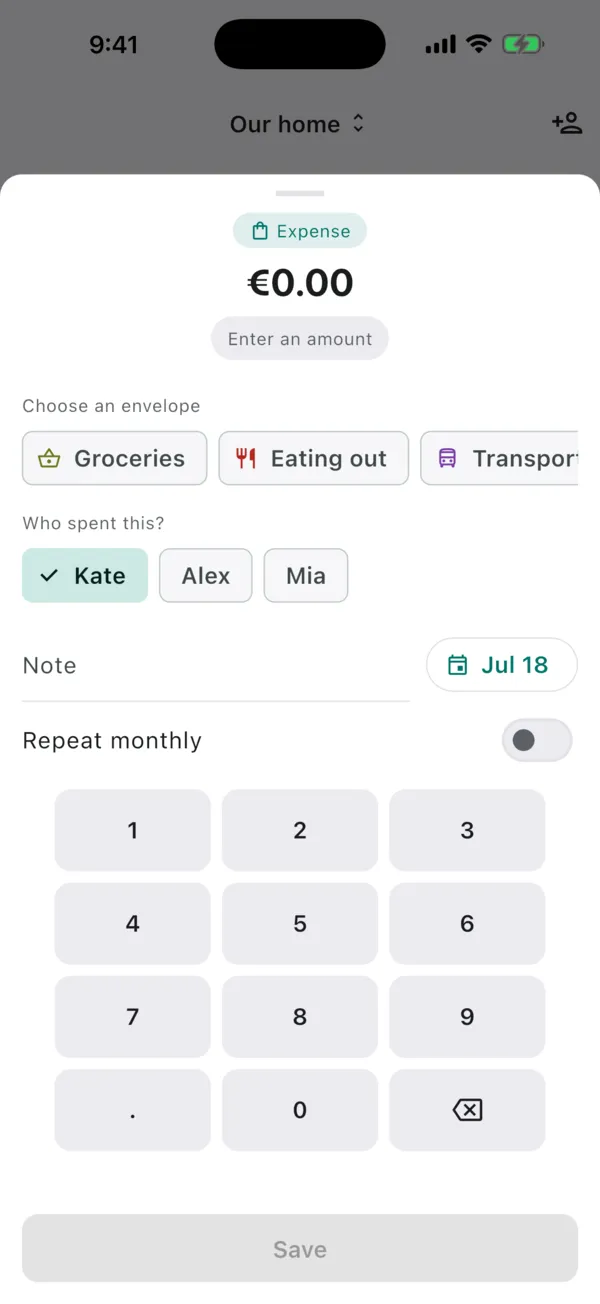
A budget app without bank connection keeps one job for you — typing in what you spend — and does the adding up. Bill Tracker is built that way on purpose: it never asks for your banking login, and there's no account to create before you can start.
Why choose a budget app without bank connection
Apps that read your bank account save you the typing, and for plenty of people that's a fair trade. Others would rather keep their budget separate from their bank, for reasons like these:
- You don't want to hand over banking access. A manual budget needs nothing from your bank: no login, no consent screen to renew, no connection that breaks.
- Your money isn't in one place. Cash, two cards, a partner's account, a meal voucher — when you type the amount yourself, it doesn't matter how you paid.
- Typing makes you notice. Entering 7.50 for a sandwich takes a few seconds, and it's exactly those seconds that keep you aware of where the month is going.
How a manual budget works day to day
In Bill Tracker you sort your spending into envelopes — groceries, housing, transport, fun — and give each one a monthly amount. You can also set just one total for the month, or no budget at all and simply track.
- Logging in seconds: amount, envelope, save, on a large numpad. Logging works offline, so it also works in a shop with no signal.
- Siri: say "Log expense in Bill Tracker" and the expense is logged without opening the app.
- Recurring income and bills: salary, rent, phone contract and subscriptions can repeat every month automatically, so you only type what changes. Any expense you've already logged can be set to repeat monthly.
- A month that starts on payday: if you're paid on the 25th, your budget month can run from the 25th to the 24th.
- Income with sources: salary, freelance work, gifts or your own labels.
A quick example. Sam gives the Groceries envelope 400 for the month. In the first week Sam logs 62.40 for the big shop, 18.90 at the market and 7.50 for a sandwich. The envelope shows 88.80 spent and 311.20 left — without a single bank transaction being read.
What stays on your phone
There's no account to create — no email, no password. There are no ads, and your data isn't sold.
A personal budget stays on your device. If you share a space with a partner or your household, only that shared space is synced, on servers in the EU (Frankfurt), and only its members can see it. You can export every transaction in a space as a CSV file, and you can delete all your data in one step.
What Bill Tracker doesn't do
Being a manual app means some things are simply not there, and it's better to know before you install:
- It doesn't import bank transactions, read SMS or scan receipts. Every expense is typed.
- It doesn't send bill due-date reminders.
- It doesn't calculate who owes whom. A shared space is one common budget, not a bill splitter.
If you want a budget you fill in yourself and understand at a glance, that short list is the point.
Free to start, Premium when you need more
The free plan includes 1 space, up to 2 people in it, up to 10 envelopes, insights, recurring bills and CSV export. Joining someone else's space by invite is always free.
Premium adds unlimited spaces, people and envelopes, plus expenses in other currencies — kept exactly as you typed them, with no conversion, and listed separately from the budget totals. It's available as a monthly or yearly subscription or a one-time Lifetime purchase, and there's a free trial.
Start in 3 steps
- Install Bill Tracker on your iPhone or iPad. There's nothing to sign up for — open it and you're in.
- Set up your envelopes. Keep the ready-made categories or rename them, and give each an amount based on what you really spent last month.
- Log each purchase when it happens, and set salary and fixed bills to repeat so the month fills itself in.
Guides for budgeting by hand
- How to track monthly expenses by hand — a routine for logging spending that takes a couple of minutes a day.
- Envelope budgeting categories — a starter list of envelopes and how many you really need.
- Envelope budgeting pros and cons — where the method works well and where it doesn't.
FAQ
Is there a budget app that doesn't link to your bank account?
Yes. Bill Tracker never connects to a bank or card. You type each expense yourself, choose an envelope and the app shows what's spent and what's left.
Does the app work offline?
Logging works offline: amount, envelope, save. A personal budget stays on your device. Shared spaces are synced so that every member sees the same numbers.
Do I need an account or an email address?
No. There's no account to create — no email and no password. You install the app and start budgeting.
Isn't typing every expense slow?
An entry is three steps on a large numpad: amount, envelope, save. Fixed costs like rent or subscriptions can repeat monthly on their own, and Siri can log an expense without opening the app.
Is Bill Tracker free?
The free plan covers 1 space for up to 2 people with up to 10 envelopes, insights, recurring bills and CSV export. Premium adds unlimited spaces, people and envelopes and expenses in other currencies.
Is there an Android version?
Not yet. Bill Tracker runs on iPhone and iPad (iOS 15 or later). An Android version is on its way — you can join the waitlist on the home page.