
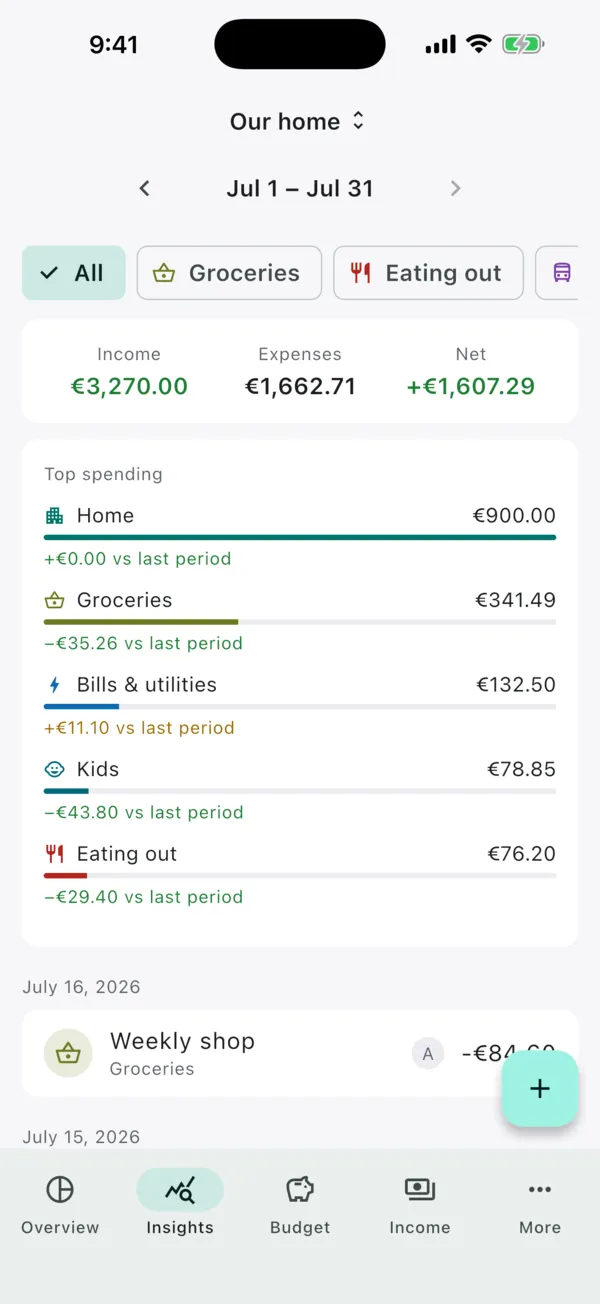
A family budget app should do one thing well: show everyone in the house the same numbers. Bill Tracker does that with one shared space for the household — the same envelopes and the same monthly budget, with every expense anyone logs counted in one place.
Why family budgets fall apart
A family budget rarely fails on the maths. It fails because only one person keeps it. The spreadsheet lives on one laptop, receipts pile up in a drawer, and by the 20th nobody knows whether there's still money for school trips or Saturday's takeaway.
Families also have more moving parts than a single person or a couple:
- Several people spend from the same money — two adults, sometimes an older child with a card, sometimes a grandparent who does the school run and the shopping.
- Kids bring costs nobody planned — a birthday party, new shoes, a club fee.
- Big bills arrive once a year — insurance, car service, holidays.
A budget that works for a family has to be easy enough that everyone adds their spending, and clear enough that anyone can check it without asking.
How Bill Tracker works as a family budget app
You create one space for the household — call it "Home" or your family name — and invite the other adults with a link. Everyone who joins sees the same budget on their own phone.
- Envelopes for the way your family spends: housing and bills, groceries, kids, transport, health, eating out, yearly costs. Start from the ready-made categories or give envelopes your own names, icons and colours.
- A budget per envelope, one total for the month, or none at all — whichever level of detail your family will actually keep up.
- Logging in seconds: amount, envelope, save, on a large numpad. It works offline, and Siri can log an expense on iPhone without opening the app.
- Recurring income and bills: salaries, rent, child benefit, phone contracts and subscriptions can repeat every month automatically, so you only type what changes.
- A month that starts on payday: if the main salary lands on the 25th, the budget month can run from the 25th to the 24th.
Kids and grandparents, added by name
Not everyone who spends family money has a phone with the app. In Bill Tracker you can add people by name — a child, a grandparent, a nanny — and log their expenses under their name. More than 2 people in a space needs Premium.
Insights then show who spent what. When each child is added by name and their costs are logged under it, the person filter shows how much went on each child this month, and the envelope filter shows where the groceries money went. That makes the weekly family money talk short: open the app, look at the same screen, decide what to change.
A simple example. The Millers give their kids envelope 300 for the month and have added Leo and Mia by name. Emma logs 45.00 for football boots under Leo's name; Dan logs 28.50 for a school trip and 16.80 for craft supplies under Mia's name. The envelope shows 209.70 left, and the person filter shows 45.00 for Leo and 45.30 for Mia.
Private, with no bank login
Bill Tracker never connects to a bank or card. You type each expense, which is also what keeps everyone aware of where the money goes. There's no account to create — no email, no password — no ads, and your data isn't sold.
A personal budget stays on your device. A shared family space is synced on servers in the EU (Frankfurt) and is visible only to its members. You can export every transaction in a space as a CSV file or delete all data in one step.
Free to start, Premium for bigger families
The free plan includes 1 space, up to 2 people in it, up to 10 envelopes, insights, recurring bills and CSV export — enough for two parents to run the household budget. Joining someone else's space by invite is always free.
Premium adds unlimited spaces, people and envelopes, so you can add the kids and grandparents by name, keep a separate space for a holiday or a renovation, and log expenses in other currencies. It's available as a monthly or yearly subscription or a one-time Lifetime purchase, and there's a free trial.
Start in 3 steps
- Install Bill Tracker on your iPhone and create a space for the household. Keep the ready-made envelopes or rename them to match your family.
- Invite the other adults with a link, and add anyone without the app by name (more than 2 people in a space needs Premium).
- Give each envelope an amount based on last month's real spending, set salaries and fixed bills to repeat, and log each purchase when it happens.
Guides for your family budget
- How to make a family budget — choosing envelopes, setting amounts and planning for yearly costs, step by step.
- How to track monthly expenses — a simple routine for logging spending that the whole family can keep.
- Envelope budgeting pros and cons — whether the envelope method suits your household.
FAQ
Is Bill Tracker free for families?
The free plan covers one space for up to 2 people with up to 10 envelopes, insights, recurring bills and CSV export — enough for two parents. To add more people, such as kids or grandparents by name, or more spaces and envelopes, you need Premium. Joining a space by invite is always free.
Can children use the family budget without their own phone?
Yes. You can add a child, a grandparent or anyone else by name and log their spending for them. Insights then show what was spent per person.
Does the app connect to our bank accounts?
No. Bill Tracker never connects to a bank or card. Everyone types their own expenses, and there's no account to create — no email and no password.
Does it work on Android?
Not yet. Bill Tracker runs on iPhone and iPad (iOS 15 or later). An Android version is on its way — you can join the waitlist on the home page.
Can we keep a separate budget for a holiday or renovation?
Yes, with Premium. Each space has its own members, envelopes, budget and currency, and you switch between spaces in one tap. The free plan includes one space.